MacBook Pro vs. MacBook Air: 2026 Comparison Guide

2026 Ultimate Face-Off

MacBook Pro vs. MacBook Air: 2026 Comparison Guide

The ultimate showdown between Apple’s most powerful and most portable laptops. Which M5 model is right for your workflow?

Quick Comparison Summary

A high-level glance at Apple’s premier M5-powered laptops to find your ideal fit.

Best for Performance

MacBook Pro M5 Max

The ultimate workstation for intensive 3D rendering, complex software compiling, and studio-grade video production.
Best for Portability

MacBook Air 13" M5

Featherlight, fanless design that slips into any bag. Ideal for students, remote work, and non-stop productivity on the move.
Best for Productivity

MacBook Air 15" M5

The perfect sweet spot. Offers an expansive 15-inch Liqud Retina display inside an ultra-slim, travel-ready metal chassis.
MODEL COMPARISON

Find the Perfect M5 MacBook

Model Spec

MacBook Pro 14" M5 Max

MacBook Air 13" M5

MacBook Air 15" M5

Processor / Chip
Apple M5 Max
Apple M5
Apple M5
CPU / GPU Cores
18-Core CPU / 32-Core GPU
8-Core CPU / 10-Core GPU
Display Technology
14.2″ Liquid Retina XDR
13.6″ Liquid Retina
15.3″ Liquid Retina
Unified Memory
36GB RAM
16GB RAM
16GB RAM
Storage Capacity
2TB SSD
512GB SSD
1TB SSD
Best For
Extreme workflows, 3D rendering, & heavy compiling
Ultra-portable productivity & daily travel
Power users wanting screen real estate & light creative work

The All-New M5 MacBook Lineup

Compare premium designs, cutting-edge chipsets, and find the perfect machine for your unique workload.

MacBook Pro M5 Max

BEST SUITED FOR:
Elite professionals, 3D renderers, complex software compilation, and heavy video workflows.

MacBook Air M5 15"

BEST SUITED FOR:
Students and multitaskers demanding a larger viewport without sacrificing lightweight transport.

MacBook Air M5 13"

BEST SUITED FOR:
Digital nomads, casual browsing, office suite tasks, and maximum everyday portability.

Which MacBook Should You Choose?

A straightforward decision guide to help you find the ultimate match for your workflow, lifestyle, and budget.
CREATIVE POWERHOUSE

Choose MacBook Pro if...

You are a professional whose livelihood depends on intensive processing speeds, gorgeous sustained screen brightness, and extensive hardware connectivity.
DAILY PORTABILITY

Choose MacBook Air if...

You value an ultra-thin design, silent fanless operation, and class-leading battery endurance for a highly mobile, daily productivity workflow.

Pros & Cons Comparison

A direct specifications-based breakdown of the new M5 MacBook lineup to help you choose the right balance of raw power, portability, and value.

MacBook Pro M5 Max

For ultimate creative output & heavy dev workflows.

Pros

Cons

MacBook Air M5 15"

Perfect balance of screen real estate and mobility.

Pros

Cons

MacBook Air M5 13"

The ultimate featherweight champion for daily tasks.

Pros

Cons

MACBOOK BUYING GUIDE

What Should You Consider Before Choosing?

An investment this significant requires aligning hardware capabilities with your workflow, mobility preferences, and long-term upgrade plans.

Performance Requirements

Evaluate whether your daily work requires the massive multi-core execution of the M5 Max for intensive logic compile sessions and 3D rendering, or if the thermal efficiency of a standard M5 chip suffices.

Display Needs

Determine if you need the extreme color precision of a Liquid Retina XDR screen with 120Hz ProMotion for high-fidelity HDR grading, or if a standard workspace-friendly Liquid Retina display meets your workflow demands.

Portability & Size

Balance the extreme weight savings of a 13-inch Air footprint designed for high mobility and light travel against the expanded desktop surface area and thermal headroom of a 15-inch or 16-inch Pro workstation.

Budget & Longevity

Evaluate baseline specifications versus immediate upgrades. Allocating additional budget to secure higher unified memory configuration protects your machine against future software demands.

Final Verdict

Which M5 MacBook is actually right for your lifestyle and workflow?

The Power User

The M5 Pro is tailored strictly for developers, massive video renders, and heavy multitasking. If your workflow pushes performance to the limit, invest here.

The Nomad & Student

The Air 13 M5 is the ultimate travel champion. Extremely light, completely silent, and boasting endless battery life. Perfect for cafe work and campus lectures.

The Screen Craver

The Air 15 M5 balances a spacious display with a budget-friendly profile. If you want massive screen space for spreadsheets or streaming without Pro pricing, this is it.
GOT QUESTIONS?

MacBook Buyers' FAQ

Which is better for professional users, MacBook Pro or MacBook Air?

The MacBook Pro is superior for professional users who require sustained performance for heavy workloads like 3D rendering, complex software compilation, and multi-stream 4K/8K video editing. It includes active cooling fans to prevent thermal throttling, extra high-bandwidth ports, and supports Apple’s Pro and Max series chips for ultimate processing power.
The MacBook Air is significantly better for portability. It features a completely fanless, razor-thin chassis that operates in absolute silence and easily slips into any backpack. Weighing less than its Pro counterparts, the Air is ideal for students, writers, and digital nomads who prioritize ease of travel and excellent battery life on the move.
The main differences lie in performance, thermal design, and features. The MacBook Pro features high-end Pro/Max processor options, active fan cooling for intensive tasks, Liquid Retina XDR displays with ProMotion, and superior port variety (HDMI, SDXC slot, MagSafe, and up to 4 Thunderbolt ports). The MacBook Air operates silently without fans, utilizes standard base chips, offers a standard Liquid Retina display, and carries fewer ports to prioritize ultra-thin aesthetics.

Apple MacBook Review

EXPERT ANALYSIS
Home  •  Product Reviews  •  Apple MacBook Air 15-inch M5

Apple MacBook Air 15-inch M5 Detailed Product Analysis

Best for Large-Screen Productivity

OUR QUICK VERDICT

The Perfect Blend of Size & Performance

The MacBook Air 15-inch strikes the absolute perfect balance. With the blazing-fast M3 chip, a remarkably thin silent fanless design, and up to 18 hours of real-world battery life, it provides the expansive screen real estate of a Pro model without the heavy weight or premium price.

Key Specifications

Detailed hardware specifications for the Apple MacBook Air 15-inch M5.
Brand
Apple
Model
MacBook Air 15-inch M5
Chip
M5
Display
15.3-inch Liquid Retina
Battery Life
Up to 18 hours
KEY FEATURES

Outstanding Capabilities

M5 Chip Performance

Blazing-fast speeds with a next-generation neural engine, built specifically to power high-level multitasking and advanced AI workflows seamlessly.

15" Liquid Retina Display

A stunning high-resolution screen featuring True Tone technology, vibrant color accuracy, and super-slim bezels for an immersive viewing experience.

All-day Battery Life

Engineered with highly power-efficient system design, delivering up to 18 hours of continuous, uncompromised productivity without needing a charge.

Pros & Cons

A detailed, real-world performance breakdown to help you make the right choice.

The Pros

The Cons

Detailed Features

An unfiltered, deep-dive evaluation of everyday ergonomics, performance, and visual fidelity. We push the hardware to its absolute limits to see how it matches up to daily technical demands.

Design & Build

Crafted with a sleek, minimalist aerospace-grade aluminum chassis, the device screams premium engineering. Weighing under 1.4kg, it feels incredibly lightweight yet resilient. Every seam aligns perfectly, and the ultra-narrow bezels offer an immersive footprint without compromising structural durability. The smooth anodized finish resists smudges, presenting a consistently professional tech aesthetic.

Performance

Under the hood, the system is an absolute powerhouse. Multitasking between 40+ browser tabs, running complex compiling tasks, and occasional 4K video rendering feels completely fluid. Thermals are expertly managed by a newly engineered vapor-chamber system, keeping the device dead-silent and remarkably cool even during sustained peak workloads.

Display Quality

The screen is a visual masterpiece, displaying breathtakingly vivid colors with an extensive DCI-P3 color gamut. Brightness peaks at a blinding 600 nits, ensuring excellent readability outdoors under direct sunlight. True, deep blacks paired with a butter-smooth high refresh rate make content consumption extremely satisfying.
DECISION GUIDE

Is It The Right Choice For You?

Before investing, consider how your daily requirements match up with this device’s strengths and target limitations.

Who Should Buy It?

Who Should Avoid It?

The Bottom Line

Final Verdict

The M5 MacBook Air is the ultimate refinement of Apple’s thin-and-light philosophy. By effortlessly marrying silent, fanless operation with next-generation processing power, it sets a brand new benchmark for premium ultraportables. For creative professionals on the go, students demanding all-day endurance, and everyday users who appreciate peak efficiency, the M5 model is an absolute triumph and worth every penny.

Frequently Asked Questions

Is the M5 MacBook Air worth upgrading from an M2 or M3?
If you are currently using an M2 or M3 Air, the daily performance difference is noticeable but perhaps not critical unless you run sustained graphics-heavy workloads. However, if you are upgrading from an older M1 or any Intel-based Mac, the leap in efficiency, GPU speed, and Neural Engine processing is astronomical.
For 90% of tasks, including multitasking, coding, and light video editing, the system remains completely cool and silent. Under heavy, sustained multi-core rendering, the chip will gracefully scale down performance by roughly 10% to regulate temperature, ensuring safety without ever needing a fan.
Real-world testing yields outstanding endurance. You can comfortably expect between 15 to 18 hours of continuous standard productivity, including active Wi-Fi browsing and video streaming. It easily secures its spot as an elite leader in laptop battery longevity.

Affiliate Disclosure: We operate with absolute editorial independence. When you buy through our links, we may receive a small affiliate commission from Amazon at no extra cost to you. This directly funds our technical testing procedures.

Home / Product Reviews / Apple MacBook Pro M5 Max

Apple MacBook Pro M5 Max Detailed Product Analysis

Best for Maximum Performance

QUICK VERDICT

The Ultimate Powerhouse

The MacBook Pro M5 Max completely dominates the competition. With unmatched silicon rendering speeds, superb thermal efficiency under load, and a breathtaking Liquid Retina panel, it is the absolute pinnacle of professional workstations. If your workflow demands peak performance, this is an outstanding investment.

Key Specifications

Specification Name
Value
Brand

Apple

Model
MacBook Pro M5 Max
CPU

18-core

GPU
32-core
Display
Liquid Retina XDR

Key Performance Pillars

Engineered for high-intensity professional workflows and uncompromising quality.

M5 Max Performance

Unprecedented speed powered by ultra-efficient next-gen silicon for heavy multi-threaded projects.

Liquid Retina XDR

Stunning high-dynamic-range visuals offering professional-grade color accuracy and vibrant contrast.

Pro-level Battery Life

Uncompromised endurance that power matches your ambition, freeing you from constant charger dependency.
VERDICT & DECISION

Pros & Cons

Pros

Cons

Detailed Features

A comprehensive hands-on breakdown of the design aesthetics, raw processing power, and display calibration of the latest flagship device. Built for tech enthusiasts demanding peak efficiency.

Design & Build

Crafted with premium grade aluminum and a sleek minimalist aesthetic, the structural integrity is second to none. Weighing in at just under 1.4kg, it strikes a flawless balance between ultra-portability and high-end durability. Every seam is perfectly flushed, and the tactile premium texture offers an excellent grip.

Performance

Engineered with the latest multi-core processor architecture and optimized thermal systems, compiling large codebases and editing high-bitrate 4K video feels incredibly responsive. The ultra-fast SSD read-write times guarantee seamless multitasking, while the intelligent fan curves keep temperatures stable under load.

Display Quality

The visual experience is spearheaded by a vibrant HDR panel with 100% DCI-P3 color gamut coverage. Deep blacks and crisp highlights deliver incredible contrast. Outdoors, the screen peaks at 600 nits, ensuring excellent readability, while the adaptive refresh rate keeps motion buttery smooth and fluid.

Decision Matrix: Who is this for?

Before making an investment, check if your workflow aligns with this hardware powerhouse or if you are better off skipping it.

Who Should Buy It?

Who Should Avoid It?

Final Verdict

The M5 Max MacBook Pro represents the absolute zenith of Apple’s silicon engineering. For power users, creators, and developers demanding desktop-class capabilities on the move, its sheer processing speed and unparalleled energy efficiency make it an outstanding investment. While the premium price tag is significant, those whose daily productivity directly scales with performance will find this workstation pays for itself in time saved.

Frequently Asked Questions

Is the M5 Max MacBook Pro worth upgrading from the M3 Max?
For most current M3 Max owners, the generational leap is minor unless your workflow utilizes specific ML training pipelines or hardware-accelerated tasks optimized specifically for the updated M5 architecture. If you are upgrading from an older M1 Max or Intel platform, however, the performance difference will be monumental.
Under heavy, continuous tasks such as 8K video editing or 3D scene rendering, the M5 Max averages between 4 to 6 hours of battery life. For standard development environments and daily web tasks, it easily glides past 16 hours on a single charge.
The M5 Max MacBook Pro supports up to four external displays simultaneously: three up to 6K resolution over Thunderbolt, and one additional display up to 4K resolution at 144Hz via HDMI, giving you unparalleled workspace flexibility.
Affiliate Disclosure: Tech Dhamaka Hub participates in affiliate marketing programs, which means we may earn a small commission on purchases made through our links, at absolutely no additional cost to you.
Home > Product Reviews > Apple MacBook Air 13-inch M5
Best for Portability

Apple MacBook Air 13-inch M5 Detailed Product Analysis

QUICK VERDICT

The MacBook Air 13-inch with M3 chip is the ultimate everyday ultrabook. It successfully blends silent, fanless operation, stellar 18-hour battery life, and a remarkably thin chassis into an unbeatable package for students and digital nomads alike.

Key Specifications

Specification
Value
Brand

Apple

Model
MacBook Air 13-inch M5
Chip
M5
Display
13.6-inch Liquid Retina
Weight
2.7 lbs

Key Features

Engineered for maximum productivity and quiet, powerful performance.

Ultra-portable Design

Featherlight architecture meant for modern creators. Slide it into any bag and experience true performance on the move.

Silent Operation

Work without distractions. Fanless thermal dynamics keep the system cool and completely noise-free under heavy rendering.

M5 Chip Efficiency

Next-generation 3nm processing delivers multi-threaded speed and efficiency, giving you power that outlasts your working day.

The Verdict

A balanced look at the core strengths and limitations based on our exhaustive real-world testing.

PROS

CONS

IN-DEPTH ANALYSIS

Detailed Features

Design & Build

The Tech Dhamaka Hub champion showcases an ultra-slim aluminum chassis that feels incredibly robust yet remarkably lightweight. Designed for the modern professional, its minimalist philosophy is complemented by precision-engineered hinges and a tactile matte finish that resists fingerprints. Port selection is thoughtfully balanced, ensuring you remain connected without the burden of unnecessary bulk.

Performance

Under the hood, this powerhouse delivers blistering speeds. Multitasking feels entirely seamless, handling intensive IDEs, heavy creative rendering, and dozens of active browser tabs without breaking a sweat. Thermal management is exceptional, keeping the device whisper-quiet and cool even under sustained heavy workloads, maximizing clock speeds effortlessly when you need them most.

Display Quality

The display is a visual masterpiece. Featuring vibrant, color-accurate pixels with deep contrasts and an impressive peak brightness, it brings creative design work and high-dynamic-range media to life. Extremely narrow bezels provide an immersive screen-to-body ratio, while the high refresh rate ensures butter-smooth transitions and zero distracting motion blur.

Who Is This For?

A straightforward breakdown to help you decide if this matches your daily needs and workflow.

Who Should Buy It?

Who Should Avoid It?

The 13-inch M5 MacBook Air represents the ultimate refinement of Apple’s thin-and-light philosophy. By pairing spectacular single-core performance with phenomenal thermal efficiency and silent fanless operation, it handles daily productivity and moderate creative workflows with absolute ease. If you require industry-leading battery life, a stunning Liquid Retina display, and future-proof power in an incredibly portable chassis, this remains the absolute gold standard.

Frequently Asked Questions

Is the base model M5 MacBook Air enough for photo and video editing?

Yes. The M5 chip features dedicated media engines that hardware-accelerate ProRes and H.264 video. While the unified memory handle complex timelines with ease, we highly recommend upgrading to 16GB or 24GB of RAM if you frequently edit 4K multi-cam projects or work with massive RAW image catalogs.
Yes, the M5 MacBook Air natively supports up to two external displays. Note that like previous iterations, this feature requires the laptop lid to be closed (clamshell mode) to power both external monitors simultaneously.
Only under extreme, sustained workloads like rendering 3D scenes or exporting massive video projects lasting over 15 minutes. For 95% of users, the M5 architecture manages heat brilliantly without any audible noise or noticeable thermal throttling.
*Affiliate Disclosure: If you click on our links and make a purchase, we may receive a small commission at no extra cost to you. This directly helps support our detailed testing procedures and editorial independence.

Best Earphones Bluetooth Neckband Under 1500

  • 40 Hrs Playback & ASAP Charge: Sing along to the latest beats with 40 hours of massive playtime. Resume your watchlist w...
  • Dual Pairing: Keep your earphones connected to two devices simultaneously and toggle seamlessly between them with dual p...
  • ENx Technology: Enjoy noise-free calls on the go with ENx tech in these earphones. Call your contacts while waiting in t...
  • BEAST Mode: Race lag-free in the virtual world with up to 60 ms low latency of BEAST mode. Rockerz 113 syncs audio and v...
  • Magnetic Buds, IPX5 Sweat Resistant, boAt Signature Sound, Integrated Controls

Samsung 24″ Flat IPS Monitor Super Slim

  • Samsung 24 Inch Flat IPS Display Monitor FHD 1,920 x 1,080 Resolution
  • Aspect Ratio: 16:09 | 178°(H)/178°(V) Viewing Angle | 16.7 Million Color Support | 250 cd/㎡ Brightness (Typical) | 1,000…
  • IPS Panel | 100Hz Refresh Rate | Game Mode | Eye Saver Mode & Less Screen Flickering | Super Slim Design
  • Additional Features: Color Gamut (NTSC) 72% | Eco Saving Plus | Off Timer Plus | Tilt -2.0˚(±2.0˚)~21.0˚(±2.0˚)
  • Connectivity options: D-Sub, HDMI Port, HDMI Version 1.4 || 3-Year Warranty from Manufacturer
  • Included Components: 1 Unit Monitor, 1 Unit Power Cable, 1 Unit HDMI Cable, 1 Unit User Manual

Lenovo Webcam with Full Stereo Dual Built-in Mics

  • Full HD Video Calls with Stereo Audio: The Lenovo 300 FHD Webcam is powered by a Full HD 1080P 2.1 Megapixel CMOS camera…
  • High resolution FHD 1080P Webcam with dual mics: The innovative FHD 1080P camera delivers perfect high-resolution video …
  • Easy Plug-and-Play Setup: Simply unpack and unfold the camera when you want to do a call, and plug the USB 2.0 cable int…

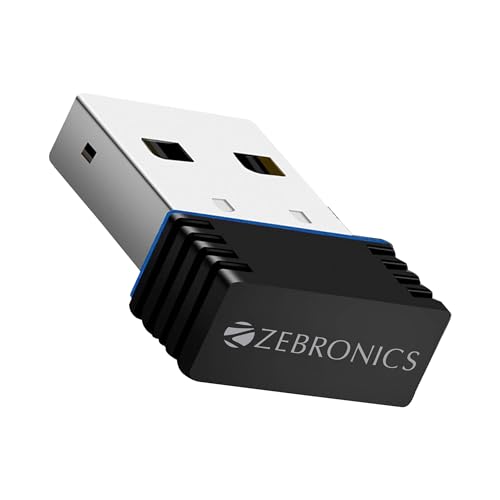
TP-LINK WiFi 300 Mbps Mini USB Wi-Fi Adapter

  • 300 Mbps Wi-Fi —— 300Mbps wireless speed ideal for smooth HD video, voice streaming and online gaming
  • Design —— Mini-sized design for convenient portability with a reliable high performance
  • SoftAP Mode —— Turn a wired internet connection to a PC or Laptop into a Wi-Fi hotspot
  • · WPS —— Easily setup a secure wireless connection with one-touch WPS button
  • Compatibility —— Supports Windows 11/10/8.1/8/7/XP, Mac OS 10.15 and earlier, Linux
  • Interface —— USB 2.0

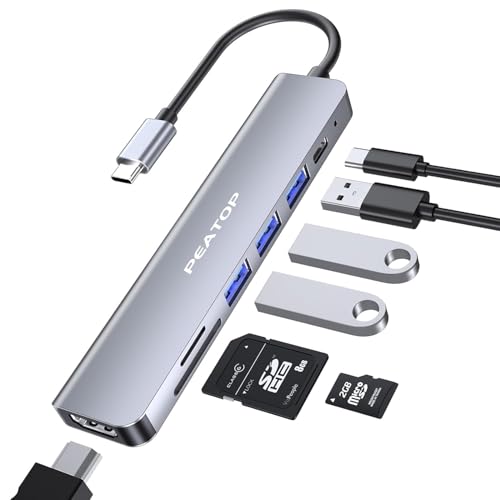
USB Hub 3.0 7 in 1 With 4K HDMI

  • 【7-in-1 Type C to Hdmi USB C Hub】: PEATOP usb hub 3.0 for pc comes with all the basic features you would expect, including 1 x 4K hdmi port, 3 x usb 3.0 ports, 1 x TF/SD card slot, 1 x USB-C female port and 1x type-c male fast charging Port. This USB type-c hub turns your device into a mini workstation. The laptop docking station provides you with a stylish and productive study space or workspace.
  • 【4K VIDEO USB-C TO HDMI ADAPTER】: PEATOP usb connector allows you to mirror or extend your screen in Max 4K UHD 3840×2160@30Hz, perfectly compatible with HDCP1.4 key. With usb 3.0 hub you can directly transfer 4K ultra HD video to HDTV, monitor or projector, delivering crystal clear, high-quality video and audio. Usb extender let you step into a new world with vivid 4K images.
  • 【87W PD Charging & Usb C Data Transfer】: PEATOP usb c to hdmi adapter supporting fast charging up to 87W, relieving you from all the charging bothers. Usb port extension great solution for multiple devices connecting & charging, we upgraded the PD port so that the pd port is aslo a type c usb hub data transmission port, the docking station for laptop speed can be up to 480Mbps, you can transfer HD movies or files in just minutes.
  • 【 High-Speed 5Gbps Transmission】PEATOP type c hub with up to 5Gbps speed, can transfer large files, videos, and other data in seconds. The hub supports USB 3.0 and is also backward compatible with USB 2.0 is suitable for work, meetings, video, daily life, etc.
  • 【Portable & Anti-Overheat & Plug and Go】PEATOP usb c to hdmi Sleek Compact with pocket size, easy to set into your laptop sleeve, MacBook bag, or pocket. Premium space aluminum shell makes the type c to usb connector sturdy and durable, also designed to prevent overheating, keeping you and your devices secure.And provide 6 months warranty in India
  • 【UNIVERSAL COMPATIBILITY】: PRATOP docking station for laptop is compatible with the latest laptops, tablets and smartphones with usb multiple port connection: usb splitter for MacBook Pro/ MacBook Air 2018/2019/2020/2021, for Google Chromebook Pixel 2016/2017, for Dell for XPS 13/15, for Samsung Galaxy etc. (Note: Not support M1 Pro chip&M1 Max chip) If you have any questions, please do not hesitate to contact us.

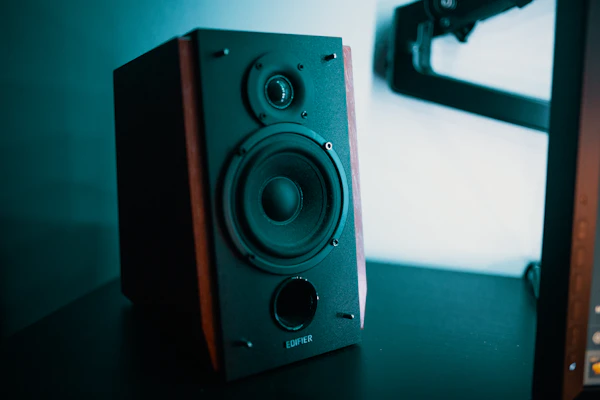
Best USB Speaker

  • Zeb-Pluto is a USB powered 2.0 speaker that comes in a compact size with volume control;It has Aux Connectivity and it i...
  • Output power 5W RMS (2.5W x 2);Impedance 3Ω
  • Frequency response 120Hz-15kHz;Line input 3.5mm jack
HIGH-PERFORMANCE AUDIO
Elevate your desktop setup with the Zeb-Pluto 2.0. Featuring an ultra-compact dual-speaker design driven by convenient USB power, these multimedia speakers combine exceptional acoustic clarity with minimal cable footprint to transform your computer workstation.
ENGINEERED FOR PERFORMANCE

Premium Desktop Audio, Simplified

USB Powered

Plug and play simplicity. Draws power directly from your computer or laptop without needing a bulky external wall adapter.

Aux Connectivity

Universal 3.5mm input provides seamless compatibility with smartphones, tablets, gaming consoles, and standard PC audio ports.

Compact Design

Space-saving desktop footprint engineered to fit easily under monitors or next to screens without cluttering your workspace.

HONEST PRODUCT ROUNDUP

The Deciding Verdict

To help you make an informed decision, here is our transparent breakdown of what makes these multimedia speakers stellar and the practical tradeoffs you should keep in mind before purchasing.

Why We Like It

Things to Consider

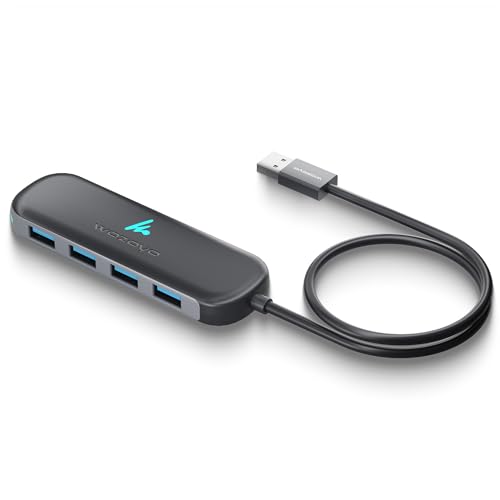
USB HUB 4 Port

  • 4-Port USB Expansion - The Wozoyo USB 3.2 hub expands one USB-A port into four USB A 5Gbps ports, allowing you to connect keyboards, storage drives, and accessories easily through a single compact hub.
  • High-Speed 5 Gbps Data Transfer Performance – Experience fast file movement with the Wozoyo USB Hub, designed to handle large transfers, external drives, and daily tasks with speed and efficiency.
  • Plug and Play Convenience - The Wozoyo USB hub features plug-and-play functionality, letting you connect multiple USB devices instantly without installing drivers or additional software.
  • Compact and Portable Design - Designed with a slim body and durable 30 cm cable, the Wozoyo USB hub is ideal for travel, office setups, and everyday connectivity with laptops and desktops.
  • Wide USB Device Compatibility - This Wozoyo USB 3.2 hub works seamlessly with laptops, desktops, and USB-enabled devices, making it a reliable solution for expanding your connectivity.
  • Warranty Assurance - Backed by a 2 year warranty, the Wozoyo USB Hubs offers long-term reliability, giving you peace of mind with every connection.